


First Grade Learning Games
4.1921.00 Reviews
App Specs
- Version
- 11.2.9
- Updated On
- License
- Free
- Downloads
- 1,000,000+
- Developer
- RosiMosi LLC
- Categories
- Educational
- Platform
- Android
Screenshots
 Analysis by AppCompare
Hey there! So, I recently had the chance to dive into the world of First Grade Learning Games, and let me tell you, it was quite the educational adventure. If you're on the hunt for a fun and interactive way to get your little ones learning, this app might just be what you need. Let’s break down what makes this app tick.
Why the First Week Can Work
For a child who enjoys tapping, matching, and getting quick feedback, the appeal is easy to understand: this is an educational game rather than a worksheet disguised as an app. Its mix of activities can make an early practice session feel less like a lesson, especially when a child is reluctant to sit down with a workbook. I would introduce it as one small part of a learning routine, not as a replacement for reading aloud, talking through sums, or hands-on play.
A practical first-week approach is to let the child explore a few activities, then notice which kinds of tasks hold attention and which cause frustration. That gives a parent a better starting point than simply asking a child whether they like the game. If they happily return to spelling but rush through number questions, for example, you can use that observation to decide what to practice together next. The useful outcome is not just screen time; it is a clearer sense of where a little support might help.
One everyday use case is a short session while dinner is being prepared or during a quiet stretch after school. I would keep an adult nearby at first, not because the controls necessarily require constant help, but because a first grader may need help choosing an activity, interpreting an instruction, or stopping at a sensible point. That small amount of supervision also lets you turn a game answer into a real conversation: ask how the child worked it out rather than treating a correct tap as the whole lesson.
Engaging Learning Experience
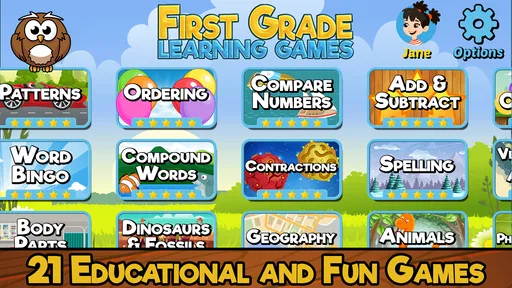
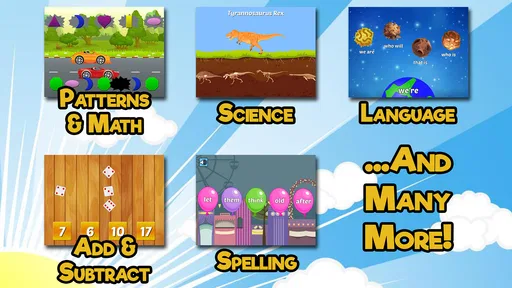
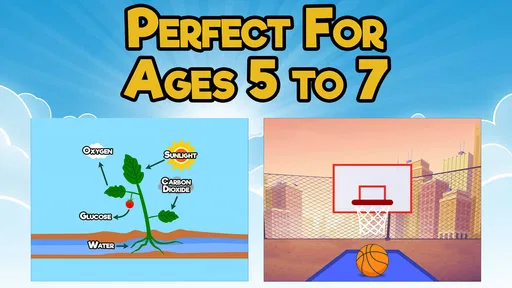
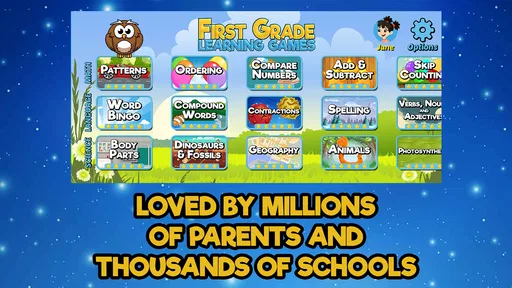
First off, the app is designed with vibrant colors and charming animations that instantly grab the attention of young learners. It’s like stepping into a classroom filled with colorful chalkboards and eager kids. The First Grade Learning Games app offers a variety of mini-games that cover different subjects like math, reading, and even basic science.
What I particularly love is how the app manages to integrate learning with play. It’s not just about solving math problems or learning new words; it’s an interactive journey where kids can explore and learn at their own pace. The games are structured in a way that doesn't feel overwhelming, which is a huge plus for keeping kids engaged without burning them out.
Diverse Range of Activities
One of the standout features of this app is its diverse range of activities. You’ve got counting games, spelling challenges, and even puzzles that help with problem-solving skills. Each activity is designed to boost a specific skill, ensuring that kids get a well-rounded learning experience.
Worth Reading Before You Choose

EA SPORTS FC Mobile 26 Is a Bigger Football Game, but It Takes Time

Flipboard Shows What News Apps Must Do Beyond the Feed

Switching to Android Auto Means Rethinking Your Driving Routine

Google Calendar Makes a Crowded Week Easier to Manage

Ludo King Makes the Most of the Minutes Between Plans

Baby Panda World Brings Quick Play to Modern Phones, but Its Game Library Feels Busy
For example, the math section isn’t just about addition and subtraction. It includes fun little quests where kids can earn rewards by completing tasks, making the learning process a bit like an adventurous treasure hunt. It’s perfect for those little ones who might need a bit of extra motivation to practice their numbers.
Making the Variety Useful
Having several kinds of activity in one place is most helpful when a child’s energy or attention changes from day to day. A parent can offer a choice between a word task and a number task instead of insisting on one fixed exercise, while still keeping the session focused on learning. I would resist the temptation to let variety turn into endless switching, though: choosing one activity, finishing a manageable stretch, and then talking about it can make the experience feel purposeful.
This also affects how I would judge progress. A child who enjoys a puzzle may be practicing patience and problem-solving, while a spelling challenge asks for a different kind of attention. Those are not interchangeable skills, so I would not treat time spent in the app as a single measure of learning. The stronger use is to pair an activity with a simple follow-up away from the screen, such as asking the child to spell a familiar word or explain a counting choice.
Compared with a single-purpose flashcard app, this collection has the advantage of offering more than one kind of practice in the same game. Compared with an open-ended educational video, it asks the child to participate rather than simply watch. The trade-off is that a collection of mini-games may not provide the depth or structure of a focused course, workbook, or teacher-led lesson. If a child needs sustained instruction in one specific skill, I would choose a resource built around that goal and use this as a lighter supplement.
Interactive and User-Friendly Interface
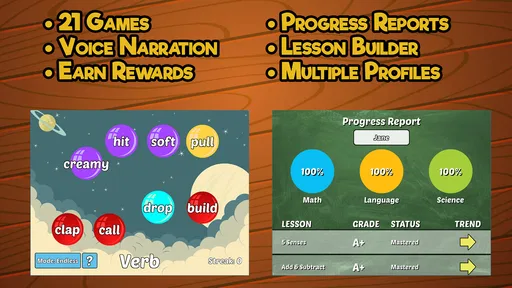
Now, let’s talk about the interface. The developers have done a fantastic job of creating a user-friendly environment that even the youngest users can navigate with ease. The app uses simple touch controls and clear navigation paths, so kids won’t need constant help from adults to find their way around.
The interactive voiceovers are another great feature. They guide the kids through each game, offering instructions and encouragement along the way. This not only helps in keeping the child engaged but also boosts their listening and comprehension skills. Plus, the positive reinforcement when they complete a task or get a correct answer is a nice touch.
Keeping Sessions Manageable
Voice guidance can make an activity more approachable for a child who is still getting comfortable reading instructions independently. At the same time, I would not assume that spoken prompts remove every obstacle: a child may still need an adult to explain a confusing idea or help them recover after a wrong answer. Staying within earshot for the first few sessions gives you a chance to tell whether the guidance is enough for your child or whether the app works better as a shared activity.
For regular use, a predictable stopping point matters more than squeezing in as many games as possible. I would decide before opening the app whether the child is doing one activity or spending a short, agreed period practicing. This reduces the familiar friction of trying to end screen time unexpectedly and makes it easier to treat the game as a repeatable habit rather than a one-off reward. If the child becomes tired or starts guessing, that is a good cue to stop and return another day.
The game is aimed at first graders, so it is most naturally suited to children who benefit from elementary-level practice and playful prompts. It may be less satisfying for an older child who already finds these tasks easy, or for a learner who needs a more advanced challenge, detailed explanations, or an adult-led teaching plan. I would also skip it as the main tool for a child who dislikes game-based practice; a paper activity or a parent reading together may be a better fit in that case.
Customizable Learning Paths
Every child learns differently, and the app acknowledges this by allowing for customizable learning paths. Parents and educators can tailor the games to fit the specific needs of the child. This means if your kid is a math whiz but needs a bit more help with reading, you can adjust the game settings accordingly.
The ability to track progress is also a handy feature. You can easily see which areas your child excels in and where they might need a bit more practice. This feedback loop is crucial for parents who want to be involved in their child’s educational journey.
Recurring Value and Maintenance
The value over a month depends less on novelty than on whether the child can return to a useful activity without the parent having to rebuild the routine each time. I would use the progress view as a prompt for a brief check-in, not as a report card: look for a topic that seems worth revisiting, then choose a small practice goal together. That keeps the parent involved without turning every session into a test.
A light maintenance routine can prevent the game from becoming background noise. Before a session, agree on what the child is practicing; afterward, ask what felt easy or tricky. If the same type of task repeatedly leads to guessing or annoyance, switch to a real-world example or take a break rather than pushing through. Conversely, if a child is confidently completing work, there is little value in repeating the same kind of session simply to keep a streak-like habit going.
Because the game is free to start and includes optional in-app purchases, I would check the purchase settings on the device before handing it over to a child. The listed purchase range is $4.99 to $39.99 per item, so a free download should not be mistaken for a promise that every available item or option costs nothing. This is a practical point for families: set expectations in advance, and make purchases an adult decision rather than something a child encounters while playing.
RosiMosi LLC made this educational game, which has an average rating of 4.2 from around 7,000 ratings, alongside about 922 written reviews and over 1 million installs. Those figures suggest that many families have tried it, but they do not settle whether it will suit a particular child. I would use them as context, then make the decision based on the child’s age, interest in mini-games, and need for this kind of practice.
Where Fatigue Can Set In
Variety can keep a first session lively, but it does not guarantee lasting interest. Repeated tasks may begin to feel familiar, and rewards can lose their pull once the child understands the pattern. That is not necessarily a flaw; it is a reason to avoid relying on the app as the only source of practice. Alternating it with books, conversations, drawing, counting objects, and ordinary schoolwork gives the child different ways to use the same skills.
There is also a difference between keeping a child occupied and helping them learn. Fast taps and cheerful feedback can make a session feel successful, but an adult still needs to notice whether the child understands the idea or is simply responding to prompts. When I want a clearer sign of understanding, I would ask the child to explain an answer in their own words or try a similar example outside the game. That small check makes the app more useful without demanding a formal lesson.
It is a free game for everyone, released on May 28, 2012, and its current version is 11.2.9. It requires Android 8.0 or later. The age guidance makes it broadly suitable for children, but that does not mean every family will want to hand over a device without supervision; parents should still decide what screen-time boundaries and purchase controls work for their household.
Final Thoughts
In conclusion, First Grade Learning Games is a fantastic tool for parents and educators looking to enhance their child’s learning experience. It combines fun and education in a way that’s engaging and effective. Whether your child is just starting first grade or needs a bit of extra practice, this app offers a delightful way to learn.
So, if you're ready to turn screen time into learning time, give this app a try. With its colorful interface, variety of games, and customizable options, it’s a great addition to any young learner’s educational toolkit. Happy learning!
My lasting verdict is that it earns a place when it fills a clear, modest role: short, supervised practice that a child is willing to revisit. I would not make it the household’s entire learning plan, nor expect the first burst of excitement to last on its own. If a child enjoys the activities, the parent uses the progress feedback thoughtfully, and sessions stay brief enough to end on a good note, it can remain a handy option after the novelty fades. If those conditions are not met, choosing a book, a focused lesson, or simply practicing together is likely the better use of that time.
Pros
- Engaging and colorful graphics.
- Wide variety of educational topics.
- User-friendly interface for kids.
- Audio support enhances learning.
- Offline play available.
Cons
- Limited free content.
- Occasional ads interrupt gameplay.
- Requires frequent updates.
- Some features need internet.
- In-app purchases can be costly.
FAQs for First Grade Learning Games
What types of educational games are included in First Grade Learning Games?
First Grade Learning Games offers a diverse range of educational activities tailored for first graders. These include math puzzles, reading exercises, spelling challenges, and problem-solving tasks. Each game is designed to align with educational standards, ensuring that children are not only entertained but also engaged in meaningful learning experiences.
Is First Grade Learning Games suitable for both Android and iOS devices?
Yes, First Grade Learning Games is available on both Android and iOS platforms. This ensures that users can download and enjoy the app on a wide range of devices, including smartphones and tablets, making it accessible to a broad audience. Links for both platforms are provided on our website.
Does the app require an internet connection to function?
First Grade Learning Games is designed to work primarily offline, allowing children to access educational content without needing an internet connection. However, some features, such as updates or additional content downloads, may require internet access. This offline capability makes it convenient for on-the-go learning.
Are there any in-app purchases or advertisements in First Grade Learning Games?
The app offers a free version with basic content and optional in-app purchases for additional features and activities. While the free version includes some advertisements, they are child-friendly and limited. Parents can choose to purchase the ad-free version to enhance the learning experience without interruptions.
How does First Grade Learning Games track and support my child's progress?
The app includes a comprehensive tracking system that monitors your child's progress across different games and activities. Parents can view detailed reports to assess strengths and areas for improvement. The app adjusts difficulty levels based on performance, ensuring a personalized learning experience that grows with your child.


